
 Parshn
Your vocabulary, gently repeated while you focus on your work.
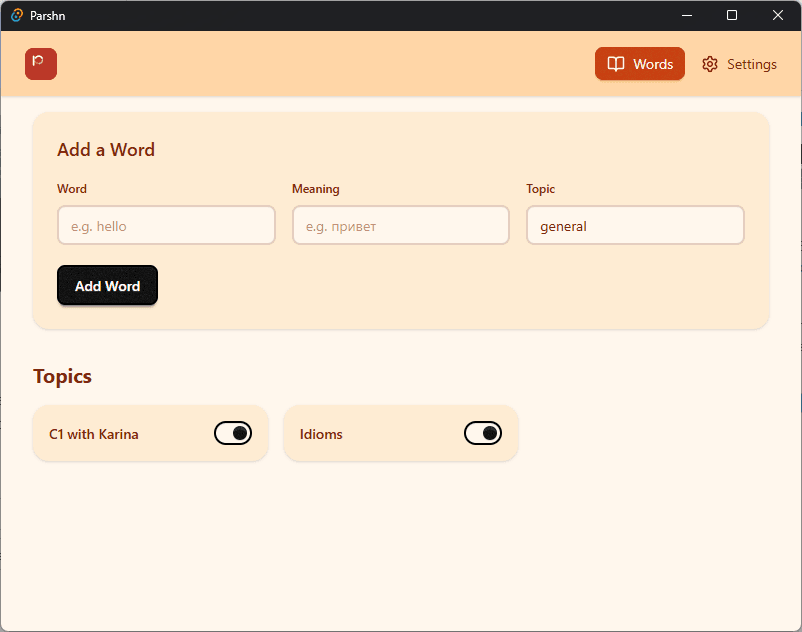
Add the words you want to learn. Parshn reminds you of them while you work.
How it works
Add your words
Save new words and their meanings directly in Parshn.
Keep working
Continue your normal work without interruption.
Learn naturally
Parshn shows your words through notifications at your preferred interval.
Remember them
Small repeated exposure helps your brain retain vocabulary.
The idea
Unconscious Continued Repetition
Instead of scheduling study sessions, Parshn reminds you of your vocabulary throughout the day.
Small repeated exposures help your brain absorb words naturally while you focus on your work.
Why Parshn
No study sessions
Learn vocabulary without interrupting your workflow.
Fully offline
Your data stays on your computer.
Your pace
Choose how often words appear.
Simple and distraction-free
No gamification. Just learning.
Buy Parshn once. Use it forever.
Early Adopter Discount
$4.99
$1.99/lifetime
☕ Less than a cup of coffee. A lifetime of vocabulary reminders.
- ✓Lifetime license, no subscription
- ✓Works fully offline
- ✓Free updates
Frequently asked questions
Does the one-time license come with future updates?
Yes. Your license includes every future update of Parshn.
Is there a free trial?
Yes. The free version lets you save up to 30 words in each topic. A license turns on notifications and removes the 30-word per-topic limit.
Why does macOS say Parshn is from an unidentified developer?
macOS shows that warning for any app it cannot trace to a paid Apple developer account. Parshn is signed, just not by Apple. Open System Settings, go to Privacy and Security, then click Open Anyway. You only do this once.
Why does Windows warn me before running the installer?
Windows SmartScreen shows that screen for installers it has not seen often yet. Parshn does not ship with a paid code signing certificate, so Windows cannot name the publisher. Click More info, then Run anyway, and the installer opens normally.